|
Engineering Tools — Bar End Loads (00334)
Bar End Loads reports the axial load in a cap, boom or stringer
at each end of each element, picking up the load that the adjacent skin panels feed
into it along its length. It is the FEMAP equivalent of Patran’s
Tools > Results > Bar End Loads and of MSC Nastran’s
BENDL case-control command — neither of which is available when you are
running FEMAP with Simcenter / NX Nastran.
If you only skim one thing: this is not the same as the bar’s axial force.
Why that matters is the rest of this page.
First, the name is ambiguous
“End load” means three different things to three different people, and the
request almost always arrives without saying which. They are not interchangeable.
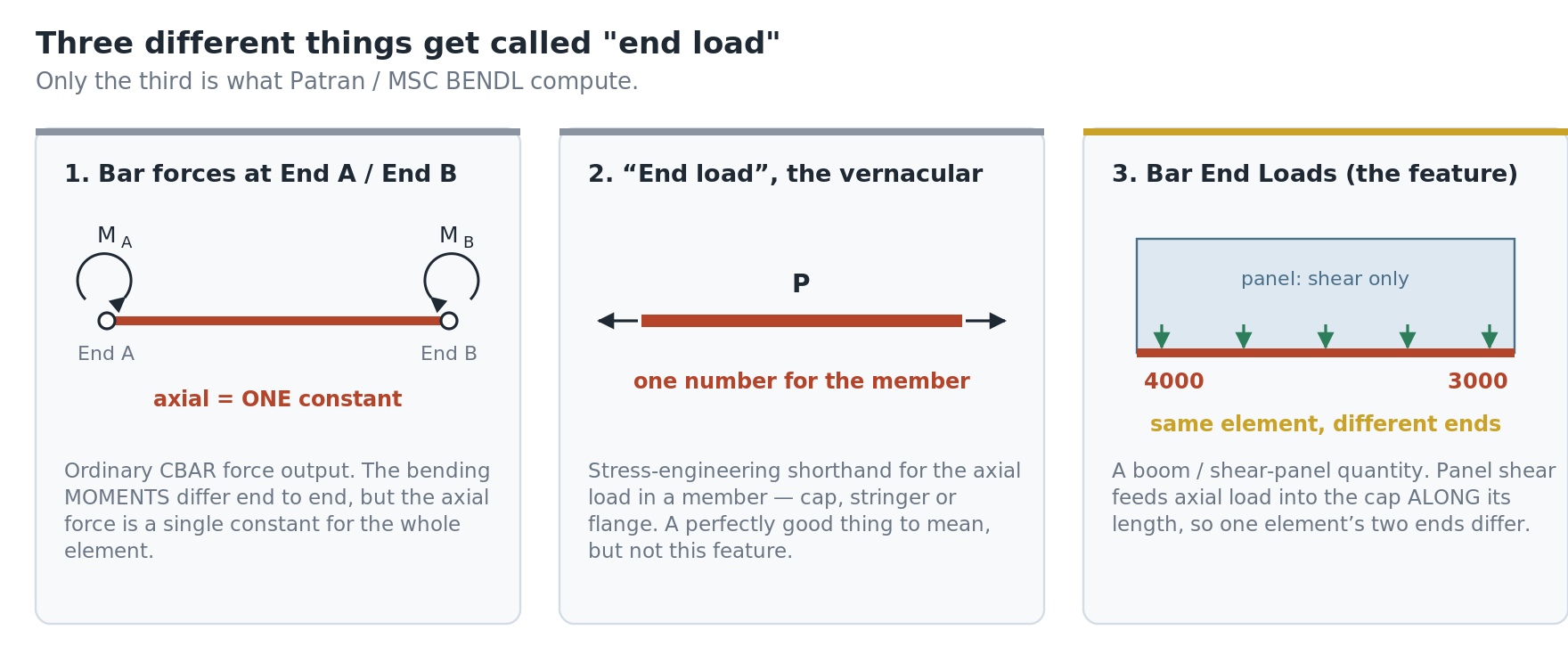
- Bar element forces at End A / End B. What Nastran prints in
FORCES IN BAR ELEMENTS (CBAR). Only the bending moments are reported per
end. The axial force, shears and torque are single constant values for the whole element, so
“the axial load at End A” is not a distinct quantity from “at End B”.
- “End load” as vernacular. Stress-engineering shorthand for the
axial load in a member — cap end loads, stringer end loads, sometimes as a running load
in lb/in. A perfectly reasonable thing to mean, and common in aerospace, but not what this
tool computes.
- Bar End Loads, the feature. A boom / shear-panel quantity. This one.
The giveaway for the third: the person is working a stiffened panel, and
they expect the two ends of one element to differ.
What the quantity actually is
It comes from the classical stiffened-panel idealization used for skin-stringer structure:
panels (skin bays) carry shear flow q in lb/in,
booms (caps, stringers, flanges — modelled as bars or rods) carry
axial load, and the panel shear feeds axial load into the boom along
its length. So the axial load in a stringer is not constant — it
accumulates as you move along it.
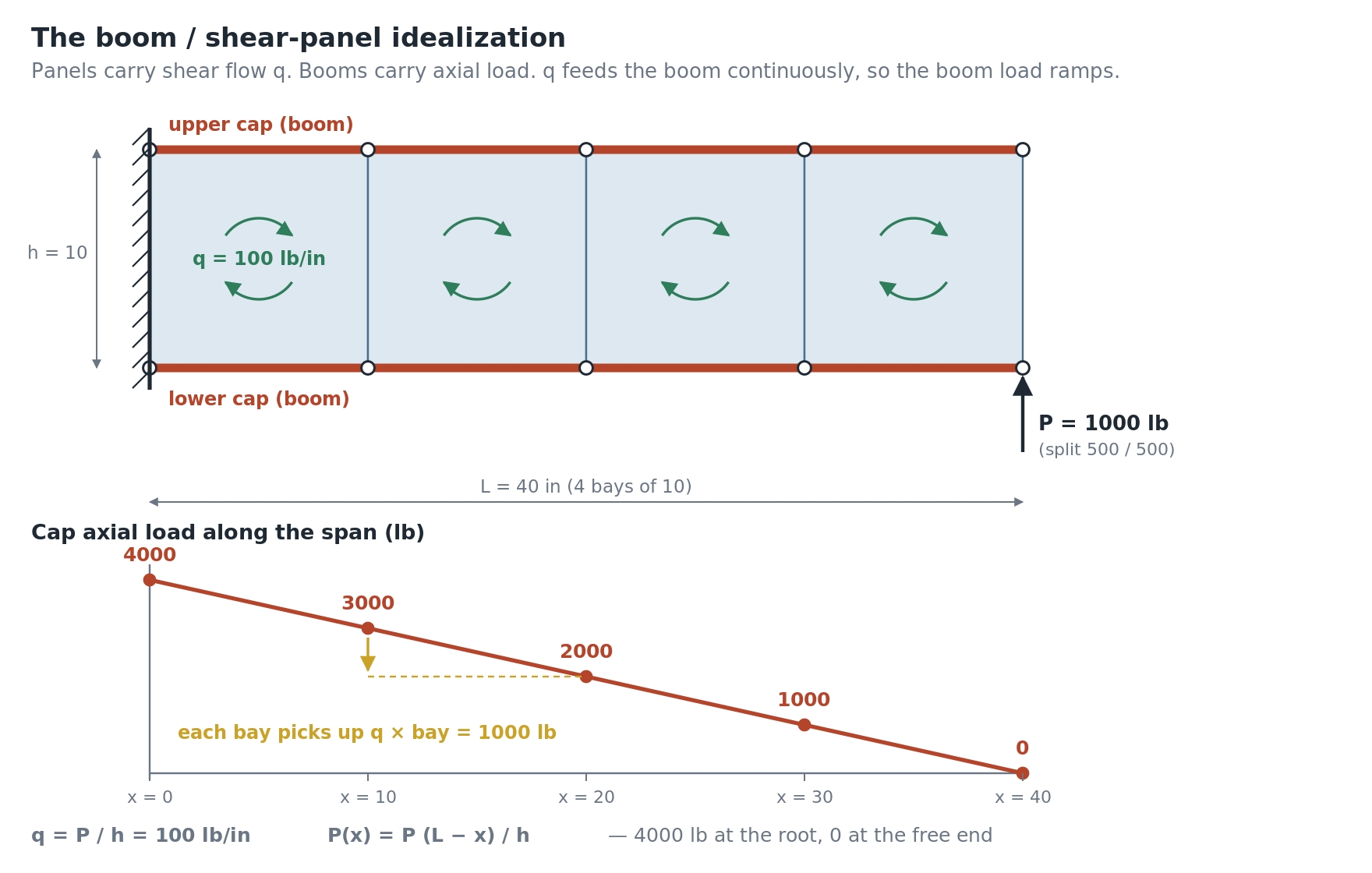
For a cantilever shear beam of length L, cap spacing h and tip
shear P:
q = P / h — shear flow, the same in every bayP(x) = P (L − x) / h — cap axial load, linear from zero at the tip
to P·L/h at the root
Why ordinary CBAR output cannot report it
A CBAR publishes one axial force for the whole element — effectively
the bay average. The two end loads sit half a bay’s shear pickup either side of it.
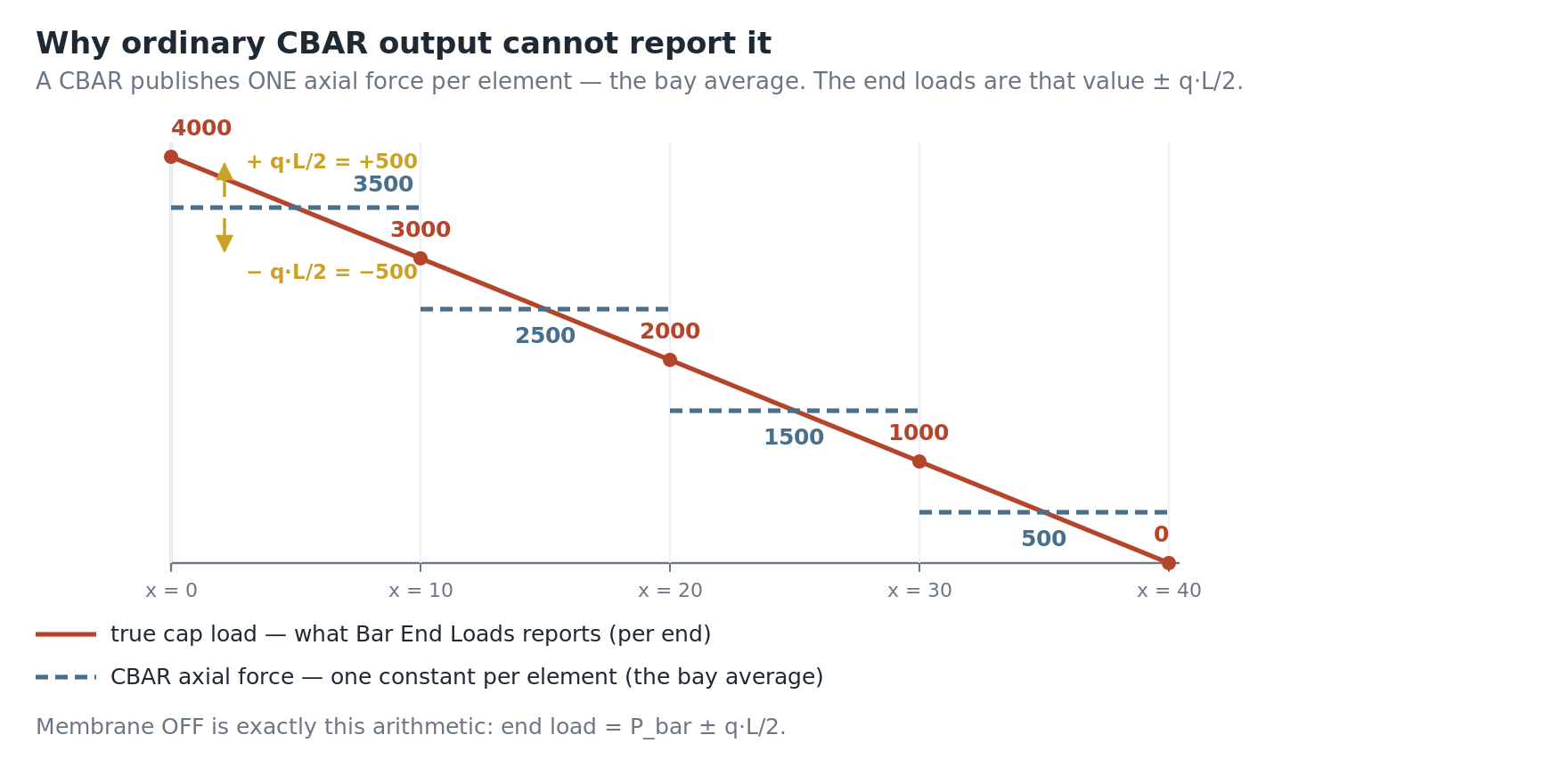
That difference — one element, two different end values — is the signature of
this quantity, and it is exactly what a constant element axial force cannot show.
Where the feature comes from
MSC Nastran has a built-in case-control command:
BENDL(PRINT = [YES, NO]) = [ALL, n, NONE]
n is a SET listing the flange / boom elements- appears in each subcase that needs it
- SOL 101 /
ANALYSIS=STATIC only
- automatically turns on
GPFORCE=ALL and PARAM,NOELOF,1
- only
CSHEAR, CQUAD4, CTRIA3, CQUADR and
CTRIAR panels contribute
Output is two F06 tables — bar end loads per element (END 1 / END 2) and panel shear
flows per edge (SHEAR 12/23/34/41). MSC labels both
APPROXIMATIONS and does not publish the method.
Patran exposes the same thing at Tools > Results > Bar End
Loads (the Bar End Load Plot form): select result cases, select elements or
groups, optional Include Membrane Loads, optional Write Report
File.
Simcenter / NX Nastran has no equivalent. There is nothing to request in
the deck and nothing to parse out of the F06, which is why the quantity has to be
computed from standard results. That is what this tool does.
The method
The tool works from ordinary element force output: the cap’s axial force plus the
shear flow in the panels that share both of the cap element’s nodes. (A shell
that shares only one node touches the cap at a point, not along it, and is ignored. Panels on
opposite sides of a cap feed shear in with opposite sense, so they are summed with a side sign
rather than being allowed to cancel.)
There are two modes, matching Patran’s Include Membrane Loads
checkbox:
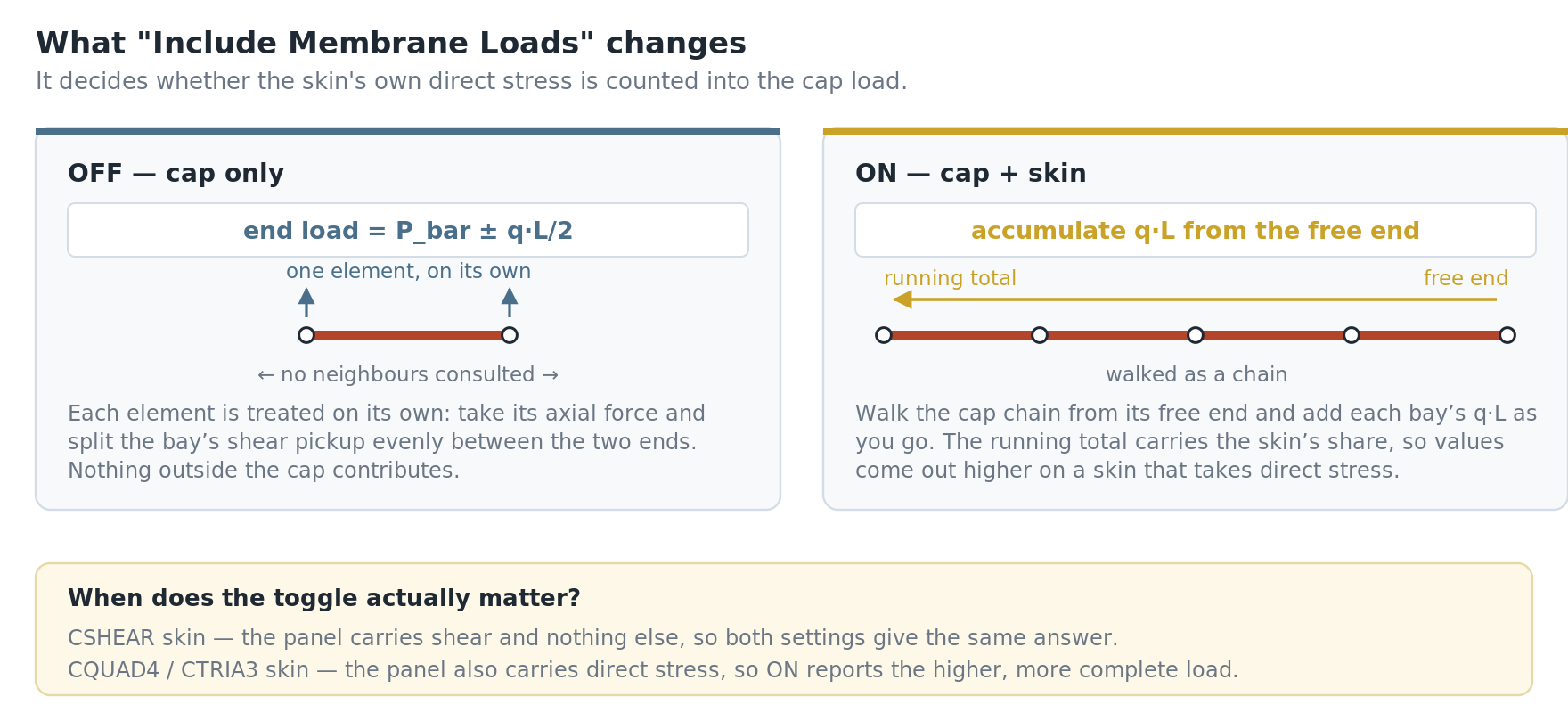
| Setting |
What it computes |
Notes |
include_membrane = False
(Patran: toggle OFF) |
P_bar ± q·L/2 |
Each element is handled on its own. No chain walk, so it works on a single picked element
and on caps with no identifiable free end. |
include_membrane = True
(Patran: toggle ON)
default |
accumulate q·L from the free end |
The tool traces each cap chain end to end, starts from the end whose cap-only load is
nearer zero (the free tip), and walks inboard, accumulating. The running total carries the
skin’s share. |
When the toggle matters: on a CSHEAR skin the panel carries
shear and nothing else, so both settings give the same answer. On a CQUAD4 /
CTRIA3 skin the panel also carries direct stress, and the ON setting reports the
higher, more complete load.
Which results the tool reads
- Cap axial —
Bar EndA Axial Force (vector 3008). There
is no Bar EndB equivalent; a CBAR’s axial force is a single constant, which
is the whole reason this tool exists.
- CSHEAR panels — the per-edge shear flows
ShearPan Shear Force12 / 23 / 34 / 41 (vectors 6015–6018). The tool works
out which panel edge the cap lies on and uses that edge’s value, which is what
Patran reports.
- Plate panels —
Plate XY Membrane Force (vector 8008),
the centroid value. Nastran publishes per-corner plate forces only if you ask for them; if you
need the edge values exactly, request FORCE(CORNER). On a regular mesh the
centroid value costs roughly 0.1%.
The tool verifies each vector by its title before using it. This is
deliberate: a wrong output-vector id does not raise an error, it quietly returns zeros, and a
column of zeros looks like a real answer.
How to use it
- Attach results and open the tool from Custom Tools > Post Processing > Bar
End Loads.
- Select the cap elements. Rubber-band freely — the selection is
filtered to rod / bar / beam elements automatically, so picking a whole region is fine.
- Select the output sets. Any number; every selected set is reported.
- The tool writes a CSV and reports which output vectors it resolved, so you can confirm it
found real results before trusting the numbers.
Settings near the top of the script:
include_membrane — the toggle described above. Default True.tension_positive — set False to flip the reported sign.write_csv, out_dir — out_dir = "" writes to
your desktop.
CSV columns
Elem, OutputSet_ID, OutputSet_Title, NodeA, NodeB, Length, nPanels, BarAxial,
ShearFlow_q, EndLoad_1, EndLoad_2
nPanels is how many shells were found sharing both of that element’s
nodes — a useful sanity check. Zero means no skin was found feeding that cap, and
EndLoad_1 and EndLoad_2 will simply equal the bar’s own axial
force.
Validation
MSC does not document the algorithm, so it was reverse-engineered against two coupon models
with known hand answers — a four-bay cantilever shear beam, identical in every respect
except the skin:
- Coupon A —
CSHEAR panels and CBAR caps:
the pure idealization, exact by hand. L = 40 (4 bays of 10), h = 10,
tip shear 1000 lb. Hand answer q = 100 lb/in, cap load
4000 → 3000 → 2000 → 1000 → 0.
- Coupon B — the same model with
CQUAD4 panels, so the
skin carries direct stress as well as shear. This is what isolates the Include Membrane
Loads toggle.
Both coupons were run in MSC Nastran and post-processed with Patran’s own Bar End
Loads tool to produce reference values. Coupon B, lower cap:
| Include Membrane Loads |
Patran reference values (lb) |
| OFF | 3416 / 2568 / 1730 / 898 |
| ON | 3903 / 2915 / 1937 / 967 |
Two findings worth recording, because both cost time:
- Using the plate centroid
Fxy for a CSHEAR panel comes
out a few pounds high. CSHEAR publishes a shear flow per edge, and Patran uses the
edge the cap actually lies on. Matching that gives exact agreement — hence the
edge-identification step described above.
BENDL was rejected by MSC Nastran 2025.1 in both documented forms
(BENDL(PRINT) = ALL and BENDL(PRINT) = n, UFM 601/610), although the
2025.1 QRG lists it. Patran’s tool works off ordinary FORCE /
GPFORCE results and is the reference implementation this tool mirrors.
Limitations
- Cap elements must be rod, bar or beam. Other element types are dropped
from the selection.
- Only shells sharing both of a cap element’s nodes contribute, so a
cap running diagonally across a mesh, or one whose skin is attached through an intermediate
node, will report
nPanels = 0.
- In accumulation mode the running total starts at zero at the lighter end
of each chain, so select the cap all the way out to its free tip. If both ends of a selected chain
carry real load (you stopped short of the tip, or the cap runs between two fittings), the tool
says so in the message window and the membrane-ON numbers are offset by the load at that end.
A closed ring has no end at all; its elements are reported on the cap-only value, with a
message.
- The quantity is an approximation by MSC’s own labelling. It answers
“how much load is in this cap here” for stiffened-panel structure; it is not a
substitute for a proper free-body cut.
Related tools
|
