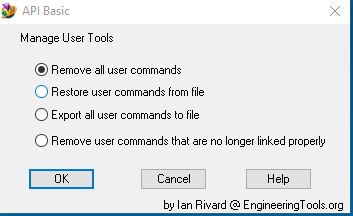
Manage User Commands
|
Script Author: Ian Rivard
Description: Manages FEMAP user commands and the Engineering Tools toolbar. Five operations: export user commands to a file, import them back, clear all user commands, remove orphaned commands whose API path is broken, and (NEW in v1.01) re-map dangling toolbar buttons that reference renamed or removed user-command titles.
Use Instructions: Run the tool. Choose your operation:
Requirements: None beyond an open FEMAP session. Option 5 requires
Notes & Example (Option 5 walk-through): If you renamed a tool from “Make Group of Whole Model” to “Whole Model Group” in a previous Engineering Tools install, a toolbar button still tries to reference the old title and FEMAP shows “User Command X is not defined.” Run Option 5: it surfaces the orphan, suggests “Whole Model Group” as the closest match (token-subset heuristic), and offers to apply. After all orphans processed, the layout is reloaded and the toolbar entries resolve cleanly.
Advanced Users: Decisions are cached per orphan caption, so duplicate references only prompt once. The XML re-write hooks the To our users: We appreciate feedback on our tools and encourage you to modify them to your specific needs. If you make an improvement you feel would be valuable to others, please submit it through our contribution page. |