|
Script Author: Ian Rivard
Save a FEMAP model's groups and layers to a text file and load them into another model,
so the organization you built survives a re-imported bulk deck, a new model variant or a
move to another machine. Property, element, node, material and layer colors and freebody
definitions can come along.
What it does
- Write to file saves every group and layer, or only the ones you pick,
with the entities they hold (nodes, elements, coordinate systems, materials, properties,
layups) and the colors and freebodies you tick.
- Read from file rebuilds those groups and layers in the open model and
restores the colors and freebodies. If a group or layer ID is already in use, the incoming
one takes the next free ID or overwrites the existing one, your choice.
- Patran: it can also write a Patran session file (.ses) that creates the
same groups in Patran, and Read accepts a Patran session file that creates groups.
- Nastran SETs: groups --> sets also writes a
_SET.bdf with a case control SET of the elements and one of the nodes of each
exported group, ready for output requests.
When you want it
- You re-imported a bulk deck (a new revision, a re-translated deck) and want your groups,
layers and colors back.
- You build the same organization on several model variants or configurations.
- You hand a model to someone working in Patran, or get groups back from Patran.
- You need only some of the groups in another model: pick them, and only their colors go
with them.
How to use it
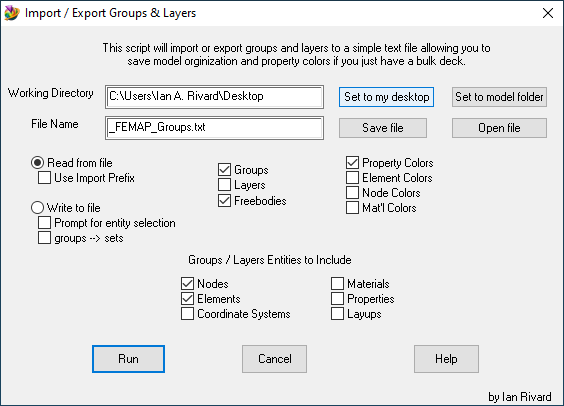
- Open Custom Tools > Model Organization > Import Export Groups
Layers.
- Set the folder and file name. Set to my desktop, Set to model folder,
Save file and Open file fill them in.
- Choose Write to file to save, or Read from file to
load. The dialog opens on Read.
- Tick Groups and/or Layers, the entity types they
should carry, and the colors and freebodies you want. Select All and Select
None set them all at once.
- Click Run.
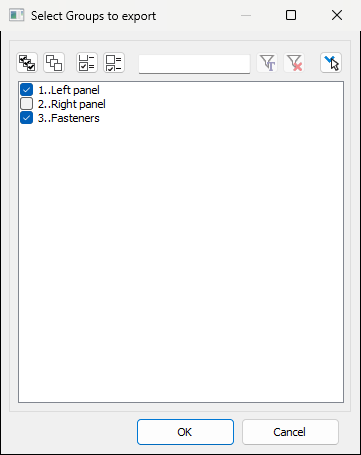
To save only some groups or layers, tick Pick groups / layers to export
before you click Run. For groups, then for layers, the tool asks how to handle them:
All, Select..., Skip or Exit. Select... opens
FEMAP's list: tick the check boxes of the ones you want and click OK.
Tips
- Picking works only when writing. If Read is still selected when you click Run, the tool
asks whether to switch to Write.
- When you pick a subset, element, node and layer colors are saved only for what those
groups and layers hold, so loading the file into another model does not recolor unrelated
entities that happen to share IDs. Property and material colors and freebodies are always
saved for the whole model.
- Groups and layers are saved by entity ID: load the file into a model with the same
numbering, such as the same bulk deck or a revision of it.
- Use Import Prefix titles the loaded groups and layers "Imported Group - ..."
and "Imported Layer - ...", so they stand apart from the model's own.
- Omit group # prefix in Patran title keeps long group IDs out of the Patran
group names.
Related tools
To our users: We appreciate feedback on our tools and encourage you to modify them to
your specific needs. If you make an improvement you feel would be valuable to others,
please submit it through our contribution page.
|
