|
Script Author: Ian Rivard
Get the Young’s modulus (E) and thickness (t) at any node in FEMAP — the
joint inputs that fastener stiffness methods such as Huth,
CR3710 and Rutman need —
for shell models and for solid (tet) meshes.
What it does
- Shell models: E1, E2 and t from the plate elements at the node,
weighted so the closest elements count most (laminates included). The same numbers
Make Rutman Fastener uses for its stiffnesses.
- Solid meshes: for a node in a fastener hole, such as an RBE spider
center, the thickness of the hole read from the mesh — the full layer by default, or
the straight bore — and the E of the material around it. No geometry needed.
How to use it
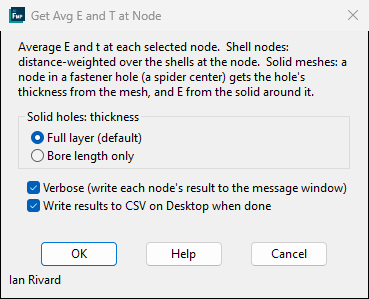
- Open Custom Tools > Model Audit > Group / Count / Measure >
Get Avg E T at node.
- For solid models, choose Full layer or Bore length only.
- Click OK and select the nodes. Results go to the message window and, if ticked, to a
CSV on your Desktop: node, E1, E2, t and how each was found.
Related tools
- Measure — thickness at every hole to a CSV, plus
point-to-point, face-to-face and wall thickness.
- Cbush Forces to Excel — the same E and t
for both ends of every CBUSH, next to its forces.
To our users: We appreciate feedback on our tools and encourage you to modify them to
your specific needs. If you make an improvement you feel would be valuable to others,
please submit it through our contribution page.
|